Barberly now has memberships. Sell monthly plans to your regulars inside your own branded app, charge their card automatically every month, and let them book included visits without paying at the chair.
A membership turns your best clients into predictable revenue. You know part of next month's income before it starts, and nobody on your team has to chase payments.
Build a membership plan
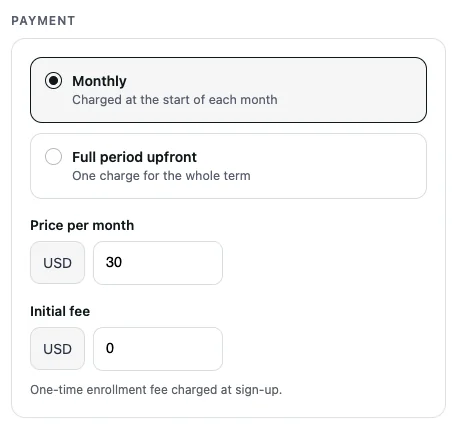
Plans are built in the Barberly portal from four blocks: how the plan is paid, how long it runs, what it includes and where it is valid. Create as many plans as you need.
What is included
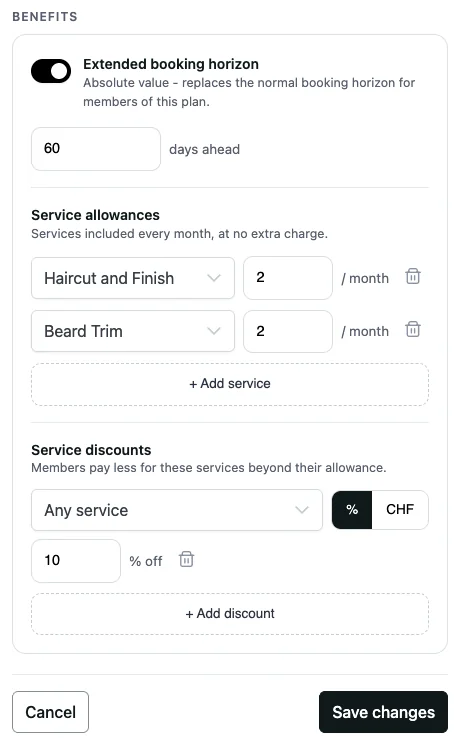
- Services included every month, for example two haircuts and one beard trim. Included visits reset at the start of each period.
- Member discounts on everything else, as a percentage or a fixed amount, for one service or for any service.
- Early booking: members can book further ahead than other clients, for example 120 days instead of 30.
Price and term
- Monthly, charged at the start of each month, or the full term upfront in one charge.
- An optional one-time joining fee, charged at sign-up only.
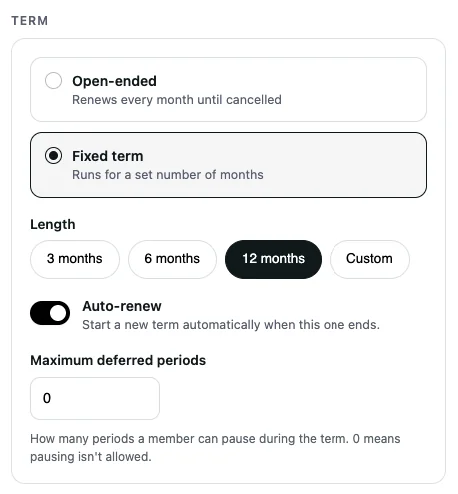
- Open-ended, renewing every month until cancelled, or a fixed term of 3, 6, 12 or a custom number of months, with or without auto-renew.
- On fixed-term plans you can allow members to defer a set number of months.
Name, photo and locations
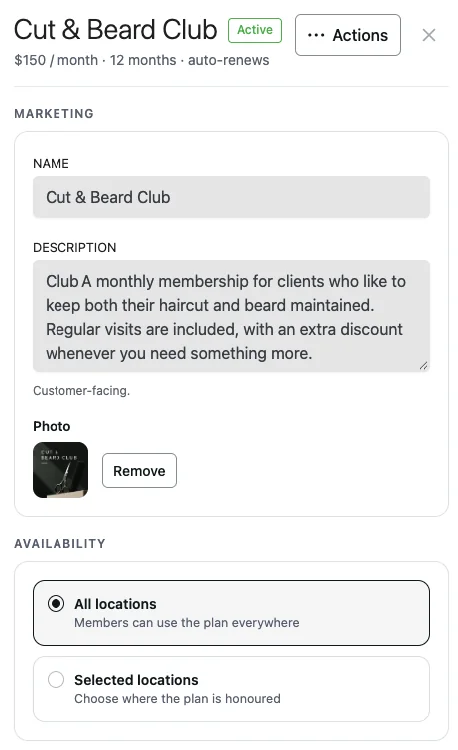
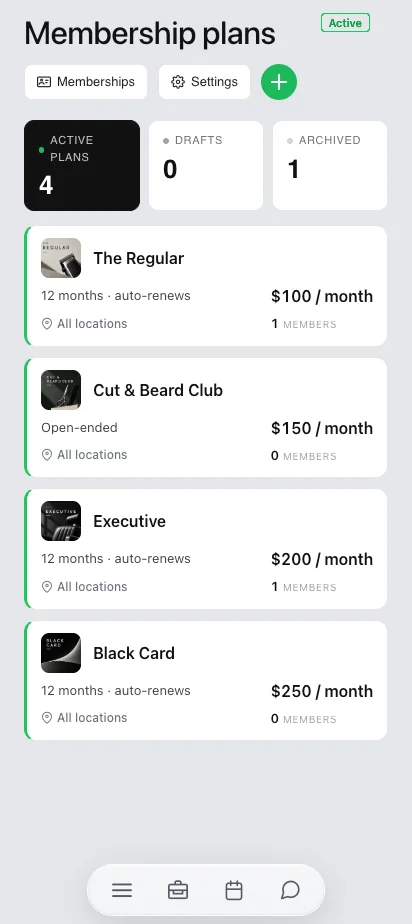
Give each plan a name, a description and a photo. They are what clients see on the plan card. Make a plan valid at all your locations or only at selected ones.
Plans can be drafted, activated, archived, duplicated and reordered. The order you set in the portal is the order clients see in the app. While a plan has active members, its price and benefits stay locked; to change them, duplicate the plan and sell the new version.
Sell memberships in the app and at the front desk
In your app. The client opens the plan, sees what is included and what is due today, and pays with a saved card or a new one. The membership starts the same day, and the card is kept for renewals.
At the front desk. In the portal, choose the client, the plan and the start date, then take the payment through your normal checkout: cash, card terminal or card on file. The membership starts when the sale is complete.
Every sale can be credited to the team member who made it, so you can track commissions. A client holds one membership at a time.
Automatic monthly payments
Renewals are charged automatically to the member's saved card through the payment provider you already use with Barberly: Stripe, Square, SumUp or Revolut. Each charge is a normal transaction in your reports.
If a charge fails, Barberly retries it 1, 3 and 5 days later. Each time the client gets a notice with a Pay now button, and you get an email after the first failure. If the client adds a new card, the overdue amount is charged at once. If the last retry fails, the membership stops: member discounts end and future bookings become regular paid visits. Nothing is removed from your calendar.
Clients get purchase, receipt, failed payment, cancellation, plan change and end notices by email, SMS or both. You choose the channel for each type and can switch any of them off.
What your members see
Memberships live in your branded app and on your website, next to booking. Every screen carries your brand, not Barberly's.
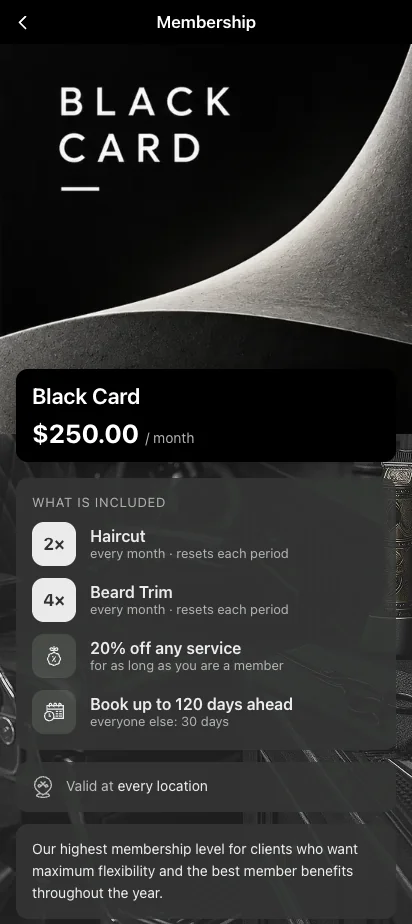
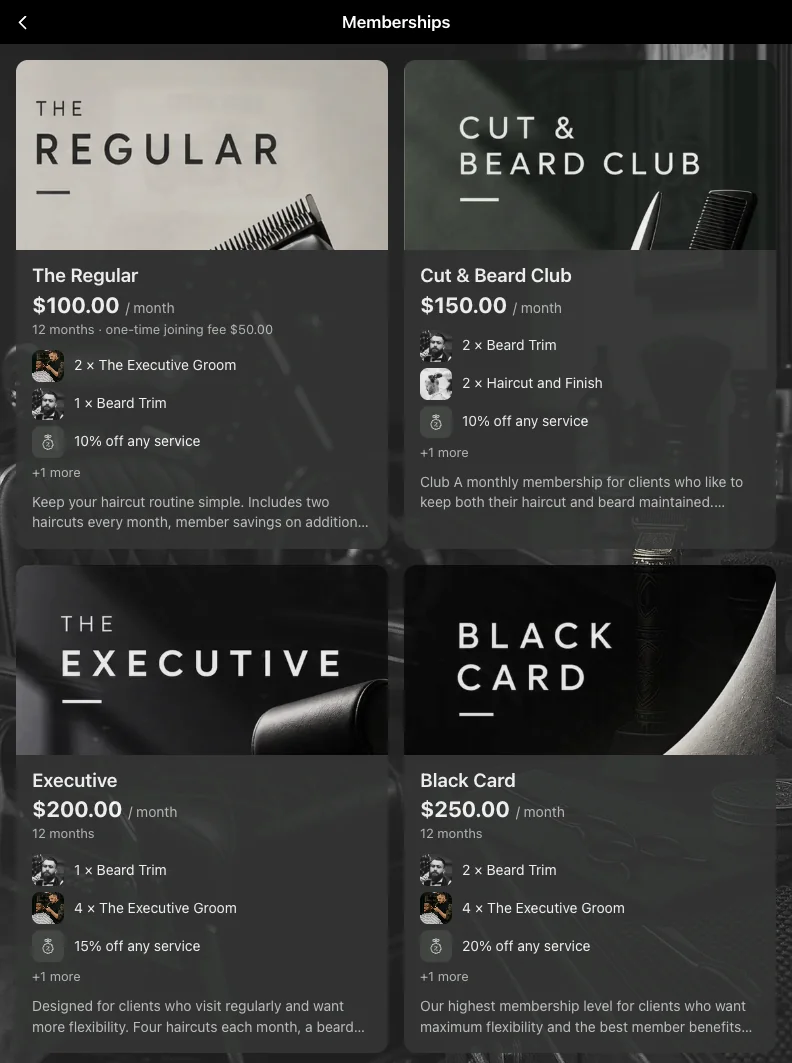
- The plan page shows the price, what is included, where it is valid and the joining fee.
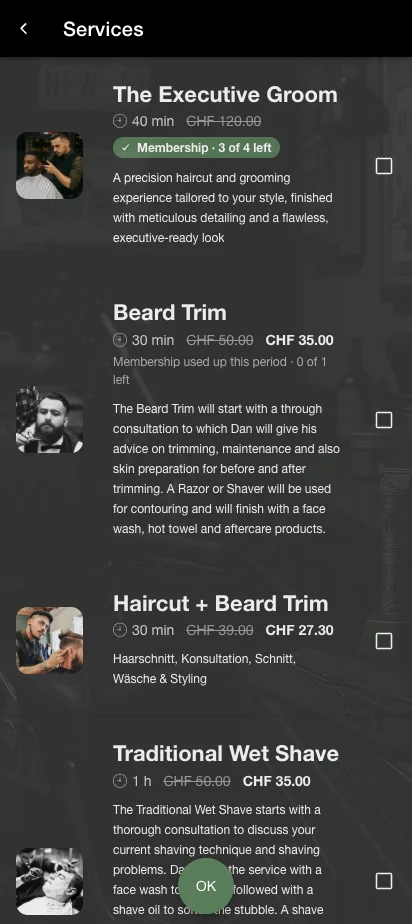
- In the service list, a covered service shows its price struck through and how many visits are left. Member discounts show as lower prices.
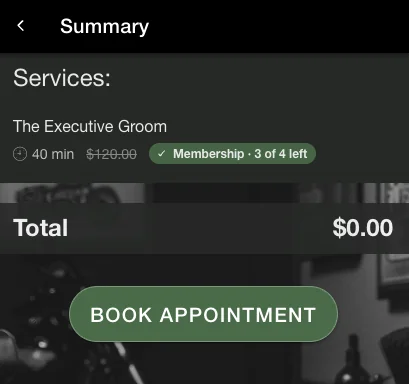
- At booking, included visits are applied automatically. A fully covered booking skips payment; a partly covered one charges only the rest.
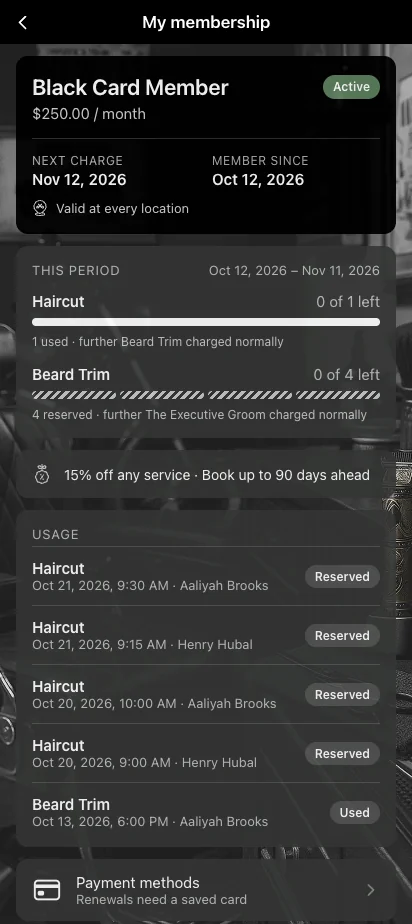
- My membership shows the status, the next charge, this period's visits used and left, and the history of visits on the plan.
Manage every member in one list
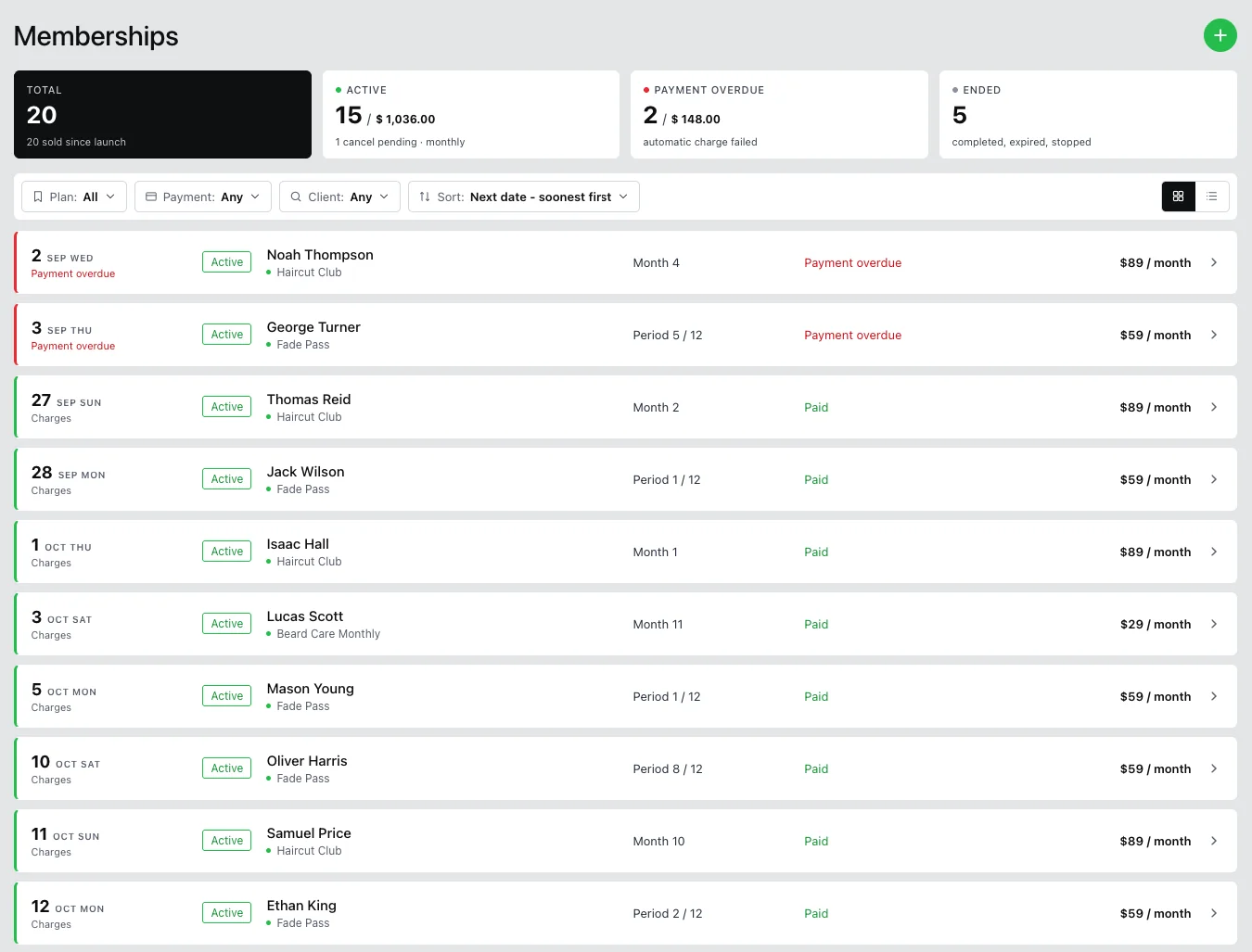
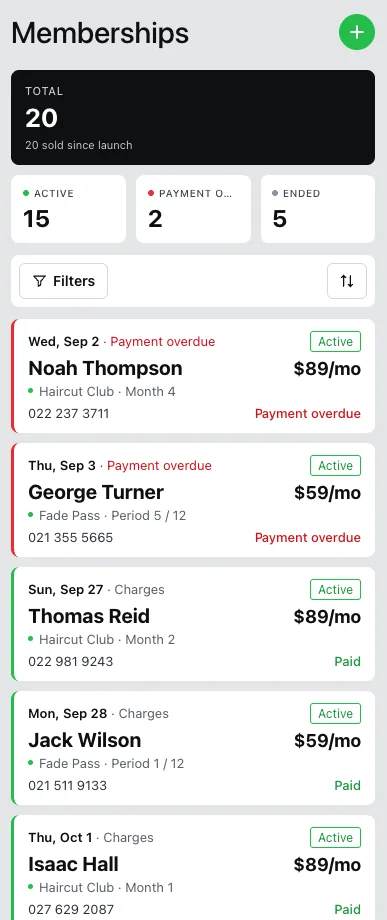
One screen shows every membership you have sold, with totals for active members and their monthly revenue, overdue payments and ended memberships. Filter by plan, payment state, seller or client.
On a member's page you see the card on file, this period's usage, the bookings that used the plan and every period with its payment. From there you can:
- Cancel at the end of the period, or immediately
- Change the plan, from the next period or right away
- Defer a month on a fixed-term plan
- Take an overdue payment
- Change who gets the "Sold by" credit
Barbers see and sell their own memberships in the Barberly business app; admins see all of them.
Call it what you like
You can rename what clients see, including the word "membership" itself, page titles and buttons. Call it a Club, a Pass or anything else. Memberships work the same in the iOS and Android apps and on your website.
What you need
- To create and manage memberships: the Barberly portal on the web, or the Barberly business app version 14.1 or later.
- For clients to buy and use memberships: your branded mobile app version 29.0.1 or later. On your website, memberships are available right away.
Frequently asked questions
Does Barberly take a cut of membership payments?
No. Barberly takes no commission. Your payment provider charges its usual card fee, the same as for any other payment.
My barbers have their own payment providers. Where does membership money go?
Membership payments always go to the shop account, even if a barber has their own provider. Each membership can be assigned to the barber who sold it, and barbers follow up with their members in the Barberly app.
What if a member books and does not show up?
If the member cancels the booking, the visit goes back to their membership. If they do not show up, the visit counts as used.
Can a client cancel or pause the membership in the app?
No. The shop cancels, changes or defers a membership in the portal. In the app, clients are asked to contact you.
Do unused visits roll over?
No. Included visits reset at the start of each period.
What happens to money when I cancel a membership immediately?
Refunds and partial periods are not calculated automatically. Settle them by hand from your transactions.
I already have members in another system. Can I move them?
Yes. Create a plan with the same terms, add your members and mark the periods they have already paid for as paid. If their terms are different, set up a separate plan for them and move them to a standard plan when it ends. Our support team can help you plan the move.
Can I sell memberships without online payments?
Yes, at the front desk. Online purchase in the app and automatic renewals need a connected payment provider.
Do memberships cost extra?
No. Memberships are included in every Barberly plan, together with your app, website and kiosk.